Buyers will now have visibility of their draft orders in their cart. If there are more than 3, the +Show All button will expand the selection to show all draft orders.
-1
Ribbon Support
Supported payment gateways article has been updated to include new additions:
The new Open Order Report is now available for Agency Admins and can be generated from the commission module by using the OPEN ORDERS button.
Commission Export Update
We've added additional fields to the existing batch CSV export to provide better insight into the associated POs.
Enhanced Commission Module Search
The PO search in the commission module has been enhanced to better handle orders where the account name has been changed.
0
Ribbon Support
Edited
POHQ Updates
The first round of POHQ updates is on the Dev site. We are still actively working on the changes, but feel free to start checking them out. If you need updated access please contact the help desk.
Here are the details of what you'll see:
Streamlined Navigation
We're streamlining the navigation
Browse - will take you to the Marketplace for browsing with a buyer
POHQ - will take you to the POHQ
Create PO - now takes you as a rep to the POHQ Create Order pop up with 1 click
Add Account from Create PO in the HQ
Similar to the Add Buyer button, you can now add an account right from the Create PO pop up
Improved Layout and Bulk Actions
We are adding additional information to the POHQ for extra visibility when working on orders (Work in progress note: right now label is the account name SKUE in the image above, but that will be updated shortly to be the vendor name as the account name is listed at the top of the menu)
The buttons have the same actions as before:
Review - will take you to the PO Details page where you can finalize the order
Edit - will expand/select the order like before so you can add/remove/edit items on that order
You will also notice checkboxes to select multiple orders at once. You can email orders or take another action from this menu
Note: with the addition of this feature, we will be disabling the automatic HFC emails when reps are in Show Mode as they now will be able to quickly email all orders from this screen.
---General Note---
We are also in the process of testing some global language updates, there's a small chance you may see some things that aren't in English- don't worry! It's just for testing. You likely won't encounter that change, just be advised of the possibility.
0
Ribbon Support
POHQ Update: Please note we are planning to release the previously mentioned updates in the next 1-2 days.
0
Ribbon Support
6/2 Release Notes
POHQ Updates are now live
See previous post for details about:
Streamlined Top Navigation
Add Account from Create PO pop up in the HQ
Improved Layout and Bulk Actions
Other updates:
Negative commission amounts now properly reflect on the open order report
Threshold for closing the commission status of an order has been set to 99%
iPad top navigation improvements for consistency with desktop view
Fixed amount discount no longer automatically updates when refreshing an order
Improvements to CC selection on iPads
Clarification of CC decline message for vendors when processing orders
0
Ribbon Support
Vendor Notification/POHQ Note:
We've been informed that when using the bulk action on the new POHQ to confirm orders that the automatic email to the vendor & rep has not yet been enabled. Please be sure to follow up directly with your vendors so they are aware of all POs since 6/2 that may have been confirmed this way.
We are working to get that feature enabled ASAP and expect it to be available in the next few days.
0
Ribbon Support
Vendor Notification/POHQ Update:
The vendor emails when orders are confirmed using the bulk action on POHQ have been enabled and should be working as expected now.
Additional release notes will be available later today.
0
Ribbon Support
6/21 Release Notes
Emails will now correctly send when using the bulk confirm action on the POHQ.
Show Mode Automatic emails when a rep puts an order in HFC have been permanently disabled.
The order status will now be visible when searching POs in the commission module create invoice screen.
Improvements have been made to the item layout in the cart and on the PO screen including the full product title displaying instead of being cut off.
The Lookbook container on the vendor profile page has been improved to avoid stretched images and better accommodate various image sizes.
The settings page has been moved to the main navigation menu:
0
Ribbon Support
6/29 Release Notes
When adding zip codes to a territory, we've added more informative notifications if the zip code already exists in another territory.
Additional warnings have been added when removing items from orders in the POHQ.
Improvements have been made to the cursor placement on ipads when editing customers.
Total invoiced is now reflecting correctly on the Sales Report screen.
0
Ribbon Support
9/5 Release Notes
Added additional warnings when canceling orders for consistency across screens and to prevent accidental updates.
Relaxed the shipping information requirements when adding and editing an account.
The product page no longer has a date filter, all products will display by default.
Status filtering on the user screen has been improved*.
*Important note - on the accounts page the dropdown will display the accounts with the selected status, but the buyer status may be different. Login access is controlled by the buyer status.
0
Ribbon Support
10/4 Release Notes
Canceling draft orders has been streamlined for ease of use.
Buyer UX enhancement: Added a SHOP button to the main navigation menu to facilitate easier marketplace access.
Ribbon Inventory/Availability integration updates - currently in internal testing. Further details to be provided soon.
0
Ribbon Support
10/31 Release Notes
*Please be advised, there is currently an issue downloading reports related to this deployment, it will be resolved this evening.
Updates:
If a user begins editing an order but does not make any changes, reps and vendors will no longer be prevented from making their own edits to the orders. If the original user has unsaved changes, they will still need to save or cancel those updates before anyone else can make changes. This is to ensure any changes by the original user are not lost.
When editing products, you can now save as Hidden and Discontinued statuses from the UI
Credit Cards can now be labeled for easy identification. After adding the card, click the edit button to add a label
Improvements have been made when switching between status filters on the screen to email order confirmations
HFC orders can now be easily cancelled by Sales Reps
0
Ribbon Support
11/14 Release Notes
Line item notes are now available for sales reps.
A vendor filter has been added to the Invoice Quick Report and Open Order Report
The "back to collection" button on the product detail page was creating confusion for users and has been removed.
0
Jeremy Cover
11/29 Release Notes
Improvements have been made to the "Quick Reports" to keep them from getting stuck, and you are now able to export reports up to several years at a time. The reports should also export much more quickly.
0
Jeremy Cover
12/28 Release Notes
Enhancements have been made to product import warnings to give more detail as to what would cause an import failure. This will give the importer a clear understanding of what is causing the file not to load. Below is an example,
When a buyer adds items to a cart, the cart drawer will not open if items are added to an existing cart. The cart drawer will only open when an item for a new vendor is selected or the buyer opens the drawer themselves.
Also, a green success notification will appear when an item is added to a cart.
Invoice history is now shown on the PO review screen with the total % invoiced listed. The newest applied invoice will be displayed at the top of the list. Note: This feature is only visible to admins and reps, vendors and buyers will not see any invoice information.
We have created admin settings (Business info and Branding) in the workdesk to separate them from user settings.
When creating a new account or buyer in the Create PO pop-up screen, the new account and/or buyer will auto-populate in the Choose account and Choose buyer fields in the Create PO pop-up.

Comments
17 comments
3/30/2022
Draft order in the cart for Buyers
Buyers will now have visibility of their draft orders in their cart. If there are more than 3, the +Show All button will expand the selection to show all draft orders.
Supported payment gateways article has been updated to include new additions:
What payment gateways does Ribbon support?
5/5 Release Notes
Open Order Report
The new Open Order Report is now available for Agency Admins and can be generated from the commission module by using the OPEN ORDERS button.
Commission Export Update
We've added additional fields to the existing batch CSV export to provide better insight into the associated POs.
Enhanced Commission Module Search
The PO search in the commission module has been enhanced to better handle orders where the account name has been changed.
POHQ Updates
The first round of POHQ updates is on the Dev site. We are still actively working on the changes, but feel free to start checking them out. If you need updated access please contact the help desk.
Here are the details of what you'll see:
Streamlined Navigation
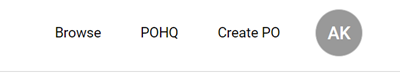
We're streamlining the navigation
Add Account from Create PO in the HQ
Similar to the Add Buyer button, you can now add an account right from the Create PO pop up
Improved Layout and Bulk Actions
We are adding additional information to the POHQ for extra visibility when working on orders (Work in progress note: right now label is the account name SKUE in the image above, but that will be updated shortly to be the vendor name as the account name is listed at the top of the menu)
The buttons have the same actions as before:
You will also notice checkboxes to select multiple orders at once. You can email orders or take another action from this menu
Note: with the addition of this feature, we will be disabling the automatic HFC emails when reps are in Show Mode as they now will be able to quickly email all orders from this screen.
---General Note---
We are also in the process of testing some global language updates, there's a small chance you may see some things that aren't in English- don't worry! It's just for testing. You likely won't encounter that change, just be advised of the possibility.
POHQ Update: Please note we are planning to release the previously mentioned updates in the next 1-2 days.
6/2 Release Notes
POHQ Updates are now live
See previous post for details about:
Other updates:
Vendor Notification/POHQ Note:
We've been informed that when using the bulk action on the new POHQ to confirm orders that the automatic email to the vendor & rep has not yet been enabled. Please be sure to follow up directly with your vendors so they are aware of all POs since 6/2 that may have been confirmed this way.
We are working to get that feature enabled ASAP and expect it to be available in the next few days.
Vendor Notification/POHQ Update:
The vendor emails when orders are confirmed using the bulk action on POHQ have been enabled and should be working as expected now.
Additional release notes will be available later today.
6/21 Release Notes
6/29 Release Notes
9/5 Release Notes
*Important note - on the accounts page the dropdown will display the accounts with the selected status, but the buyer status may be different. Login access is controlled by the buyer status.
10/4 Release Notes
10/31 Release Notes
*Please be advised, there is currently an issue downloading reports related to this deployment, it will be resolved this evening.
Updates:
11/14 Release Notes
11/29 Release Notes
12/28 Release Notes
Release Notes Update:
Follow the 2023 article linked here
Today's update has been posted there.
Please sign in to leave a comment.