
Filling out enhancement columns is the final step. It helps buyers with search and discovery. We recommend giving some careful consideration to your product taxonomy as this is how buyers will be able to refine their searches and use filters in order to find your products.
This is how it looks on the CSV file

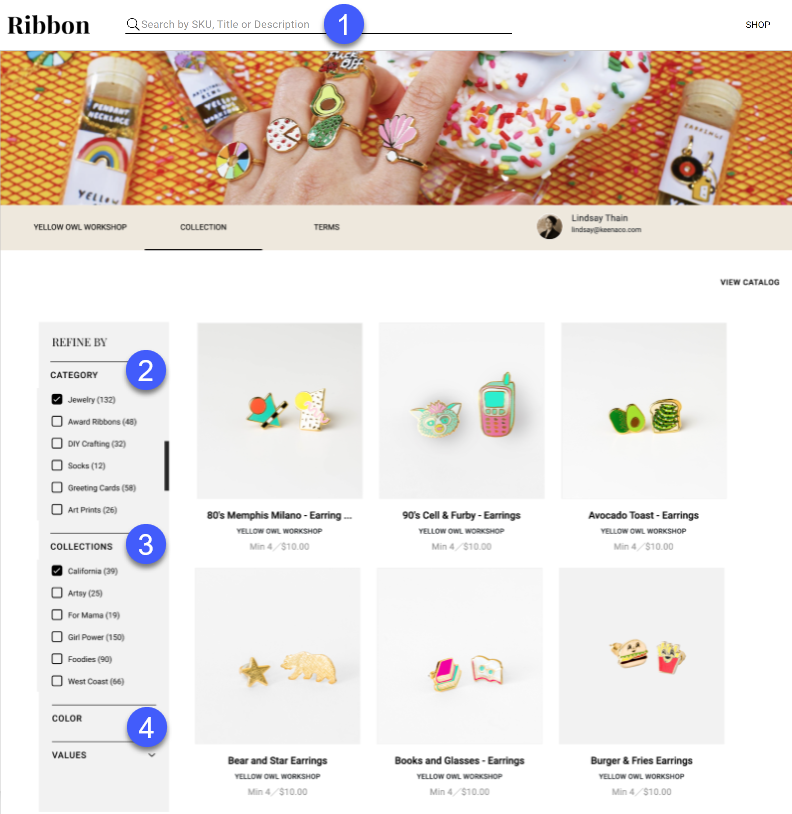
Here is how it will look and function on your collections page.
- Product Tags

- Think of these as Instagram hashtags. They are searchable keywords buyers can use to find specific sets of products
- You can add multiple tags to each product by separating the tags with a comma.
- Type (or Category)

- These are pre-determined categories and subcategories that buyers use to filter your collection.
- Category and sub-categories are separated by a ">".
- Example:-
House>Blankets&Throws, House>Candles&Accessories
{Accepted with Spaces too}
House>Blankets & Throws, House>Candles & Accessories.
- Collection

- These are filters you can create that buyers can use to easily filter products.
- Additional Filters

- Color - color of your product
- Room - which room it this product likely to be used or found
- Origin - where the product was made
- Values - Any values about the product you would like pointed out
- Examples: Women owned, Eco-friendly, Fair Trade, Handmade, LGBTQ owned, Organic, etc.
- Materials - what your product is made from
Comments
0 comments
Please sign in to leave a comment.